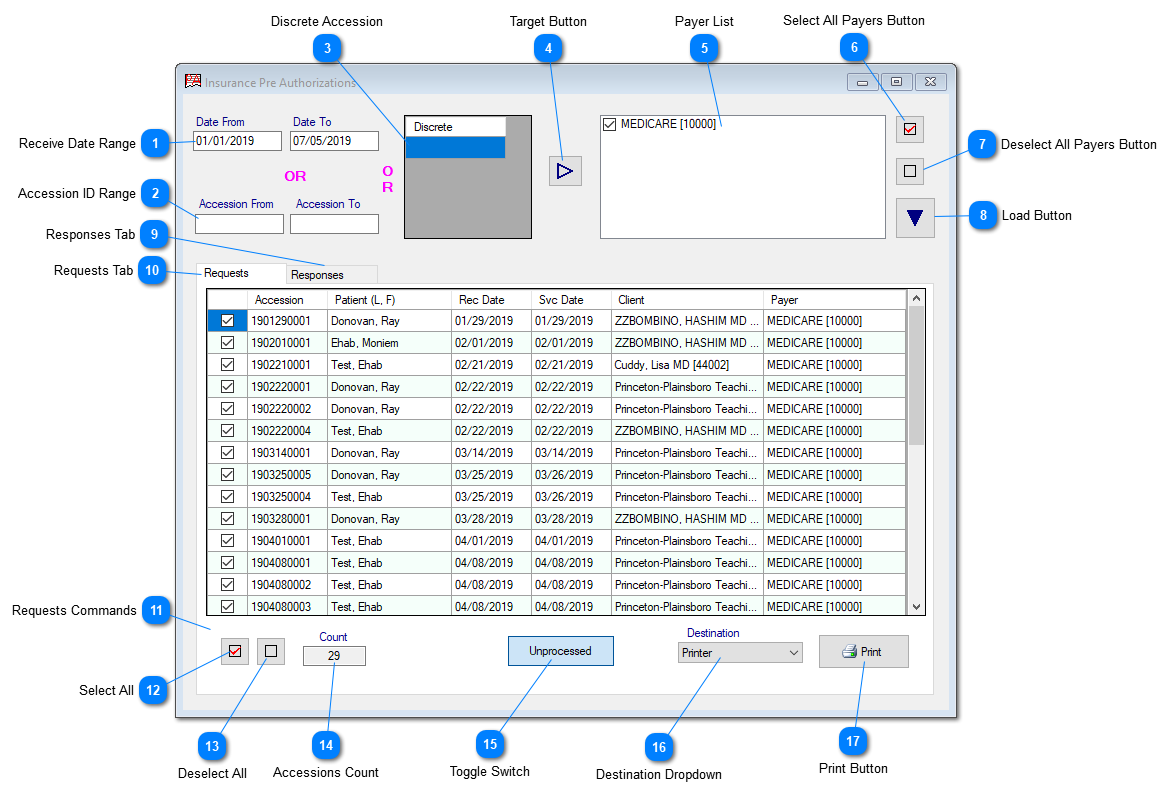
Insurance PreAuthorization routine in Prolis, provides you the capability to print the payer specific pre-authorization forms and record the response received from the payer in return. The same routine will be enhanced to accommodate the electronic version of the process if and when any payer makes the API available, to interact with.
Instant Procedure:
The routine assumes the payer specific authorization report forms have been setup in the Payer Management, prior to interacting with this routine. The routine will not pull accessions in the absence of the form in the Payer's record.
Receive Date Range
The Receive Date Range is comprised of 2 fields, to enter the starting date and the ending date in 'From' and the 'To' fields respectively. The routine works on a single date if either of the fields, is entered. This date range is exclusive to the accession date range and the discrete accessions field.
The Accession ID Range can be used to enter the starting accession ID and the ending accession ID. The routine works on a single accession ID as well. This accession ID range is exclusive to the Date date Range and the discrete accessions field.
The field accommodate multiple discrete accession IDs, one per line. This discrete accessions field is exclusive to the date range and the accession date range.
This button when clicked, after entering one of the 3 initial parameters (date range or the accession range or the discrete accessions), pulls the payers associated with the accessions resulting from the initial parameter.
The list of the payers resulted by clicking the Target button. This list can be used as a 2nd filter to the accessions, being processed for the PreAuthorization.
This dropdown presents 2 choices, Printer on the Screen. The later only appears if selected accessions are less than 5. The screen choice is used only for viewing. The printer choice registers the processed pre authorization, in Prolis, to be ready to accommodate the payer response.