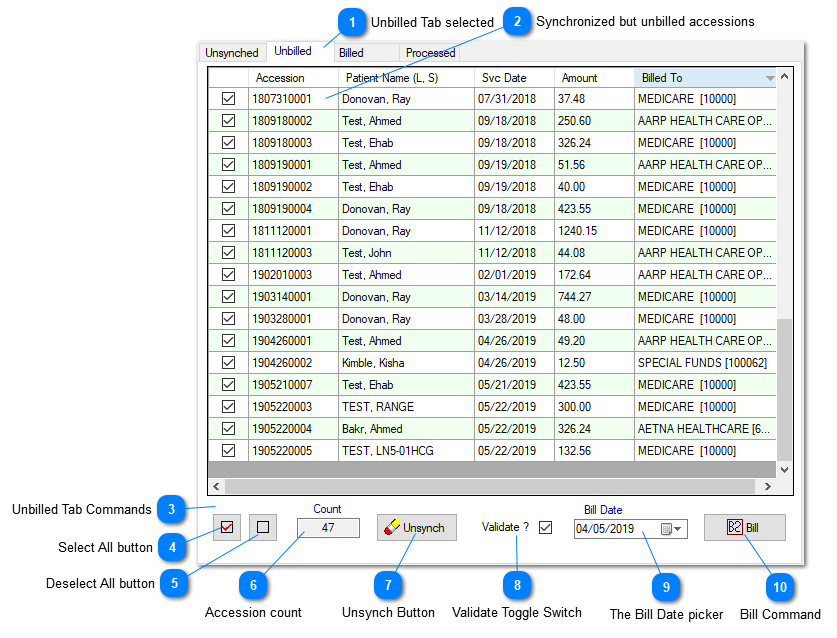
Prior to selecting the data on the dashboard, if this Tab is selected, will be populated with the synchronized but unbilled accessions,
against the selection made on the dashboard.
Unbilled Tab selected
Contains synchronized but unbilled accessions and all the related commands to select / deselect all, reverse the synchronization a toggle switch to validate or not, the billing date option prior to execute billing and the billing command button.
A command set to select / deselect all the accessions within the Tab, accession count within the Tab, Unsynch button to reverse the synching od the displayed accessions, validate or skip the validation prior to the billing, bill date option and the actual billing command.
If checked, will force Prolis to perform validation of all the member elements defined and configured as 'required' in the third party Payer (Insurance Co), the accession is being billed to. The validation elements are the patient address, the ordering provider NPI number, the subscriber Policy#, the subscriber Group#, the diagnosis code(s), the correct procedure code of the billable item (CPT Code), the Dx pointers (the medically necessary compatibility of CPT codes to the Diagnosis codes) and the line price (id captured if zero).