Reflexing
Prolis offers reflexing (triggering) of component ordering based on the entry of specific result for a test ordered by the user, automatically. Reflexing can be setup on qualitative tests (called Choice Reflexing) as well as on quantitative tests
(called Numeric Reflexing).
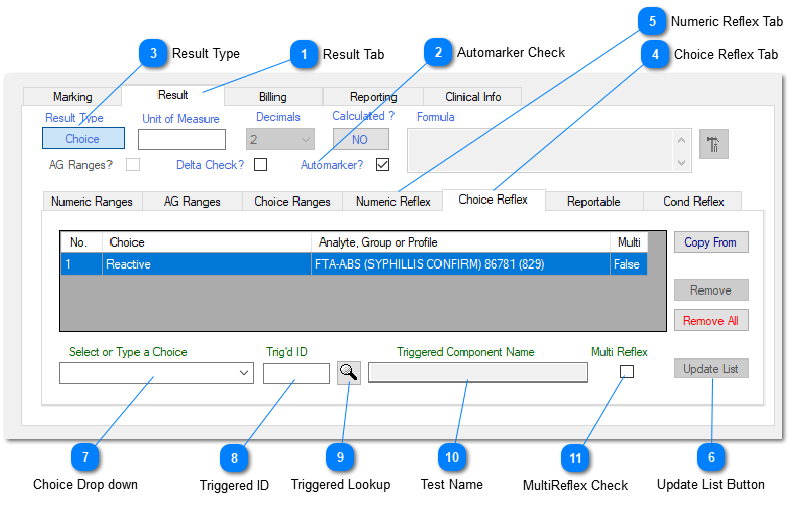
Reflexing can be setup when adding a new test in the Dictionary or edititing an existing test, using the Analyte Management routine. Follow the procedure below;
1. Click the Analyte Management routine of the Components menu item, under the Dictionary menu.
2. After entering / editing the information in all of the indicated fields, click the Result Tab.
3. Place a check in the Automarker Check field. Based on the Result Type (Choice or Numeric), system will enable the appropriate Reflex Tab (Numeric or Choice).
4. For Choice Reflexing, fill the information of fields 7. Enter the Test ID or the Group ID of the component to be reflexed
in the field 8, or use the field 9 (Lookup button) to enter the desired component.
5. Place a check mark on field 11, for Microbiology reflexing (a scenario of multiple organisms of a culture) only. All other reflexes should not have this checked on field 11.
6. Click the Update List button (field 6).
7. Click the Save button.