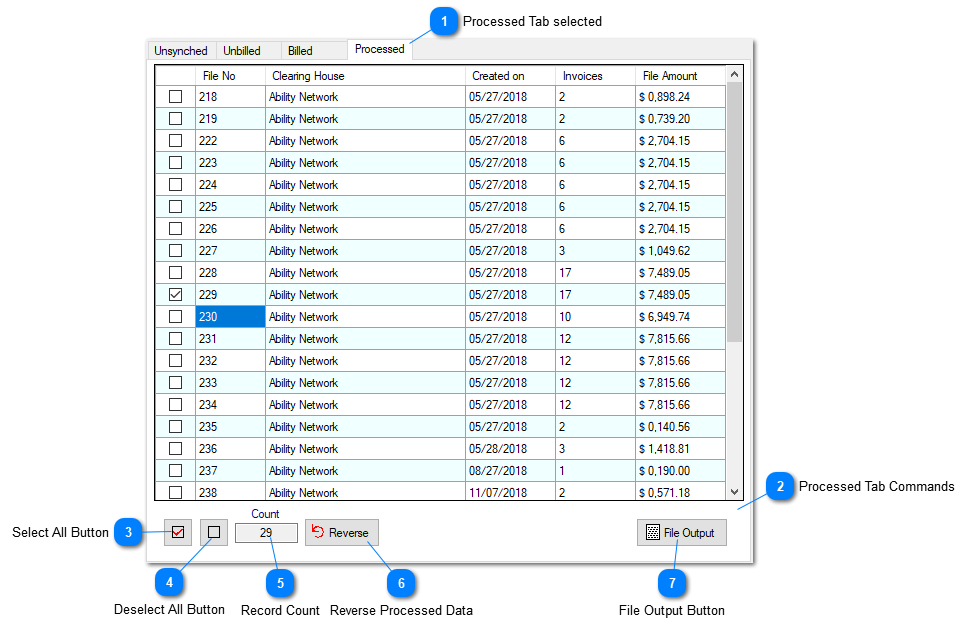
Processed Tab of Billing Dashboard
Prior to selecting the data on the dashboard, if this Tab is selected, will be populated with the processed data. For Insurance Billing 837 files and for other billing types printed invoices are displayed against the selection made on the dashboard.
 Processed Tab selectedContains processed data (837 files for the Insurance Billing and invoices for the other billing types) and the related functional commands.
|
 Processed Tab CommandsSelect / Deselect All, the Count, Reverse and the File Output fields/Buttons.
|
 Select All ButtonClick this button to select all of the displayed data.
|
 Deselect All ButtonClick this button to deselect all of the displayed data.
|
 Record CountNumber of displayed records.
|
 Reverse Processed DataUse this button to un-tag the invoices processed for printing or inclusion of a 837 file. This command becomes available only if a single file is selected.
|
 File Output ButtonClick this button to see the selected 837 file contents. This command becomes available only if a single file is selected.
|