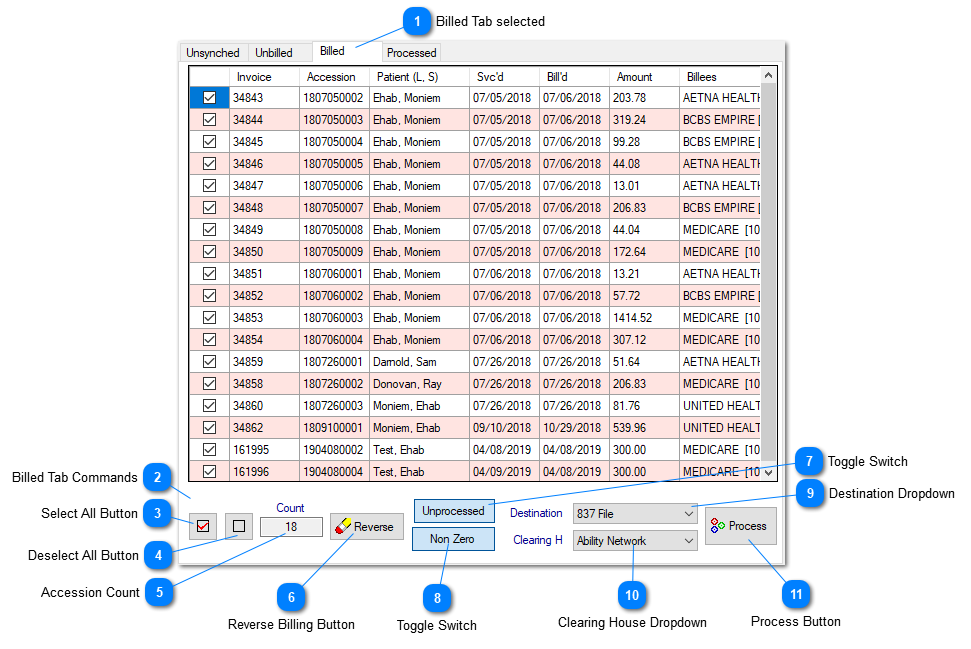
Billed Tab of Billing DashboardPrior to selecting the data on the dashboard, if this Tab is selected, will be populated with the billed but unprocessed accessions,
against the selection made on the dashboard.
 Billed Tab selectedContains billed but unprocessed accessions along with the invoice ID and all the related commands to select / deselect all, Accession Count, reverse billing button, toggle switch for Unprocessed or All, a Toggle switch for Non Zero or All, Process Destination selector, the Clearing House selector and the Process command button.
|
 Billed Tab CommandsCommands to select All, Deselect All, Accession Count, Reverse billing button, Toggle switch for Unprocessed or All, a Toggle switch for Non Zero or All, Process Destination selector (Printer, Screen or 837 File), the Clearing House selector and the Process command button.
|
 Select All ButtonClick this button to select all accessions displayed in the grid.
|
 Deselect All ButtonClick this button to deselect all accessions displayed in the grid.
|
 Accession CountThe field displays the number of accessions in the grid.
|
 Reverse Billing ButtonClick this button to reverse the billing of the selected accessions in the grid.
|
 Toggle SwitchThis Toggle Switch is a filter between Unprocessed and All for searching and displaying accessions.
|
 Toggle SwitchThis Toggle Switch is a filter between Non-zero and All invoices search and display for processing.
|
 Destination DropdownThe Destination Dropdown is used to send the process output to the destination selected here. This dropdown gets populated dynamically, with various choices, per system logic defined by the Architect. The logic is written for the following destinations;
-
Printer: for unlimited accessions/Invoices to be printed at the printer selected at the start of the process. Client Billing yields Client Statement with multiple invoices between the date range specified in the dashboard, on a plain paper. Insurance Billing yields CMS 1500 print of each selected invoice in the grid, on pre-loaded plain paper or the CMS 1500 forms. Patient Billing yields the patient invoice on a plain paper for each selected accession within the grid. .
-
Screen: A limited selected output is available for viewing. For Client Billing only one client's statement, for Insurance Billing and Patient Billing maximum of 4-5 invoices can be viewed.
-
837 File: This destination is available only for the Insurance Billing, for unlimited accessions/invoices.
|
 Clearing House DropdownUse this dropdown to select the appropriate Clearing House the 837 file is destining to. The Clearing House is setup using the Partner Management in Prolis.
|
 Process ButtonClick this button to invoke the process selected in the Destination dropdown.
|
|